




Myriam HINDERER
Chief Marketing & Communication Officer
2026-05-27
Which platforms demonetize videos for profanity?
Discover which platforms demonetize videos for profanity and how editors automatically censor swear words directly inside Premiere Pro and DaVinci Resolve using AutoCut with AutoProfanity Filter.
Summarize content with
 Chatgpt
 Mistral
 Gemini
 Perplexity
Why platforms care about profanity?
Most social platforms rely on advertising revenue.
And advertisers want their ads displayed next to content that feels “brand safe”.
That’s why algorithms increasingly analyze spoken audio, captions, and transcripts to identify potentially explicit content.
This can impact :
- monetization
- CPMs and RPMs
- recommendations
- discoverability
- age restrictions
- brand collaborations
More than 500 hours of video are uploaded to YouTube every minute, and platforms increasingly rely on automated moderation systems to analyze content at scale.
For editors and creators publishing consistently, especially long-form content, profanity moderation has quietly become part of the editing workflow.
The problem is that reviewing every swear word manually is repetitive, time-consuming work with almost no creative value.
For editors and creators publishing multiple videos every week, manually censoring profanity can easily represent several extra hours of editing every month.
Which platforms are affected?
YouTube
YouTube is probably the platform creators associate the most with profanity demonetization.
Strong profanity, especially during the first moments of a video, can trigger:
- limited ads
- reduced monetization
- lower reach
- reduced advertiser suitability
Gaming channels, podcasts, reaction videos, interviews, and commentary content are particularly exposed because conversations tend to be spontaneous and less scripted.
A one-hour podcast can easily contain dozens of profanities. And manually editing every single one becomes exhausting very quickly.
That’s why many editors now automate this part of the workflow.
You can see how AutoProfanity Filter works here.
TikTok
TikTok is heavily algorithm-driven.
Videos containing explicit language may receive:
- lower distribution
- reduced visibility on the For You Page
- fewer monetization opportunities
- less advertiser-friendly placement
This becomes even more problematic for creators posting daily content.
No one wants to manually scrub dozens of short-form videos every week just to remove a few words.
Instagram and Facebook
Meta platforms are less transparent about profanity moderation, but many creators and agencies report reduced reach or weaker ad performance when videos contain repeated explicit language.
For client work and sponsored content, keeping videos advertiser-friendly is often non-negotiable.
Twitch
Livestreams are naturally less controlled.
But once clips are repurposed for YouTube Shorts, TikTok, Instagram Reels, or sponsored campaigns, profanity can become an issue very quickly.
Many streamers therefore clean up their edited content before reposting it elsewhere.
The real pain point: manual censorship kills workflow
This is where most editors lose time.
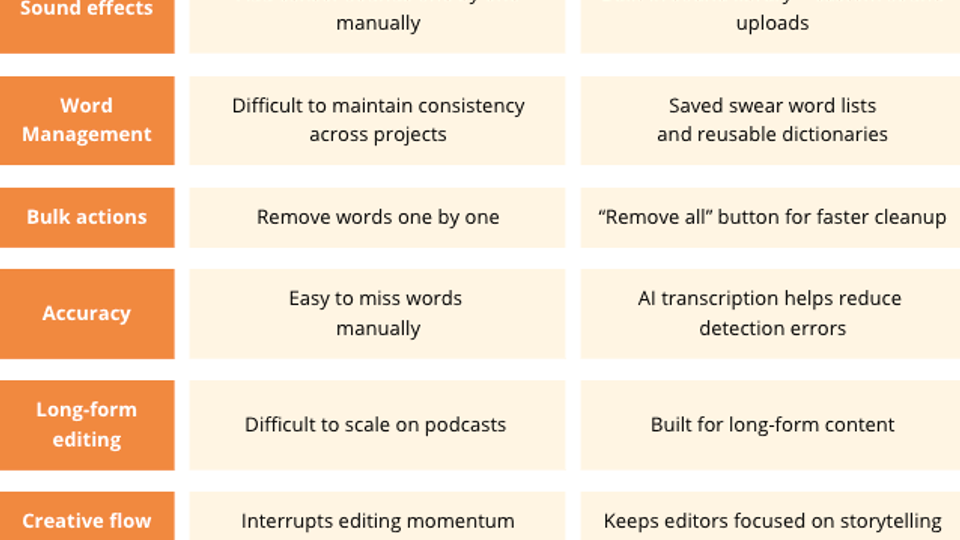
The manual workflow usually looks like this:
- watch the entire timeline
- identify every swear word
- cut the audio manually
- add a censor beep
- adjust timing precisely
- repeat the process dozens of times
On long-form content, this becomes incredibly repetitive. And the worst part is that it’s not creative work. It’s just technical cleanup.
What is AutoProfanity Filter?
AutoProfanity Filter is an AI-powered feature from AutoCut that automatically detects and censors profanities directly inside your editing software.
No exporting.
No external web platform.
No re-importing files.
Everything happens directly inside your timeline in Premiere Pro or DaVinci Resolve.
The goal is simple: remove repetitive editing work.
Why many editors avoid web-based AI tools
Most AI video tools require creators to:
- export their video
- upload it online
- wait for processing
- download the result
- re-import everything into the editing software
For editors working daily inside Premiere Pro or DaVinci Resolve, this creates unnecessary friction.
AutoCut works directly inside the editing timeline, which keeps the workflow faster and smoother.
How AutoProfanity Filter works
The workflow is designed to stay simple, fast, and fully integrated inside your editing software.
1. Define the sections to analyze
Start by selecting the parts of your timeline you want AutoProfanity Filter to process.
You can analyze the entire timeline, use custom In/Out points or select specific audio tracks
2. Select the audio language
Choose the language spoken in your timeline so AutoCut can generate a more accurate transcription and improve profanity detection.
This helps reduce false detections and improves overall filtering accuracy.
3. Customize the profanity filtering settings
Before launching the process, you can fully customize how profanities are handled.
AutoProfanity Filter allows you to:
- choose from built-in bleep sound effects
- upload your own custom censor sounds
- mute profanities entirely
- create and save your own swear word lists
- reuse dictionaries across projects
- instantly remove detected words with the “Remove all” button
Because the feature relies on AI transcription, detected profanities are highlighted directly inside the generated transcript, making the review process much faster and easier.
4. Remove profanities automatically
Once everything is configured, AutoCut automatically:
- detects profanities
- applies censorship
- synchronizes sound effects correctly on the timeline
Who uses AutoProfanity Filter?
AutoProfanity Filter is used by editors and creators working on all types of long-form and short-form content.
Common use cases include:
- YouTube monetized videos
- podcasts and video podcasts
- gaming videos and livestream highlights
- branded and sponsored content
- interview content
- educational videos
- Twitch clips repurposed for social media
- corporate and client videos
- social-first short-form content
It is particularly useful for:
- podcast editors handling long recordings
- YouTubers monetizing their content
- gaming creators publishing frequently
- agencies editing sponsored videos
- Twitch streamers repurposing clips
- freelance video editors managing multiple clients
- social media teams producing content at scale
- educational creators keeping videos advertiser-friendly
Why creators and editors use AutoProfanity Filter
- Save time on repetitive edits : Instead of manually editing every swear word, the process becomes nearly automatic.
- Protect monetization more easily : Creators reduce the risk of demonetization or advertiser limitations.
- Keep sponsored content brand-safe
Final thoughts
Profanity moderation is becoming part of the reality of modern content creation.
Whether you publish on YouTube, TikTok, Instagram, Facebook, or Twitch, explicit language can impact monetization and visibility.
But manually censoring every swear word is slow, repetitive, and frustrating.
Stop wasting time manually censoring every swear word.
Try AutoCut AutoProfanity Filter and clean up long-form videos in minutes directly inside Premiere Pro and DaVinci Resolve.
AutoCut is built for repetitive editing tasks
AutoProfanity Filter is part of the broader AutoCut ecosystem designed to remove the most time-consuming parts of video editing.
Thousands of editors also use AutoCut to:
- remove silences automatically
- generate animated captions
- edit multicam podcasts faster
- add zooms automatically
- detect viral moments
- insert B-Rolls
- detect repetitions
- generate chapters
- resize videos
The philosophy behind AutoCut is simple: less repetitive work, more creative flow.
FAQ
Censor swear words in videos : Common questions
Everything creators and editors need to know about profanity demonetization, advertiser-friendly content, and automatic swear word censorship in Premiere Pro and DaVinci Resolve.
Yes. YouTube may reduce monetization for videos containing strong profanity, especially at the beginning of a video or when profanity is repeated excessively.
Yes. TikTok may limit visibility or monetization opportunities for videos containing explicit language.
Many creators manually mute words or add censor beeps during editing.
Others use AI-powered tools like AutoCut to automatically detect and censor profanity.
You can use AutoProfanity Filter to automatically detect and censor profanities on Adobe Premiere Pro and DaVinci Resolve
Yes. AutoProfanity Filter works with both Adobe Premiere Pro and DaVinci Resolve.
Yes. Videos containing excessive profanity may receive limited ads or reduced advertiser suitability on YouTube.
Yes. You can test AutoCut for free here with a 14-day free trial and no credit card required here.
Myriam HINDERER
Chief Marketing & Communication Officer