




Really easy to use. I personally use the Podcast & Silence features since I'm running a podcast of my own. Really saves me a lot of time that I spend now editing the thumbnail. I’d definitely recommend it!


Detect speakers and automate multicamera cuts while keeping full control over camera timing, reaction shots, and your podcast's rhythm.
14-day free trial - No credit card required!
Step-by-Step
Easily tell AutoCut who each speaker is and assign their individual audio track. This ensures accurate speaker detection and camera switching for a polished final edit.
If you’ve got wide shots, don’t worry. AutoCut also handles multiple speakers per camera with ease.
Define the minimum and maximum time each camera should stay on screen. Want dynamic cuts? Set a short max duration. Prefer longer takes? Increase it, it’s all up to you.
Testimonials
Really easy to use. I personally use the Podcast & Silence features since I'm running a podcast of my own. Really saves me a lot of time that I spend now editing the thumbnail. I’d definitely recommend it!
I really like the Podcast features. It helped me a lot in my editing process.

I mainly use the AutoCut Podcast feature — it's been a game-changer for streamlining my podcast editing process. It's a must-have for content creators looking to save time while maintaining professional-quality edits.

Thank you for this product! Editing podcast is now a pleasure!

Great features! Best for podcast multi-cam editing. I used this plugin mainly for AutoCut Podcast feature. Saved me a lot of time.

The best plugin for Podcast Studio owners. Thank you very much!

I love the fact you have helped me save so much time on annoying editing processes. Editing podcasts is what I mainly use it for, as well as making shorts and adding subtitles to them. I have already recommended it to a couple of friends.

I mainly use it for editing podcasts in multi-camera, and it's great! Kudos to the whole team for this great tool. I highly recommend it!

AutoCut's podcast feature simply blew my mind. I used to spend hours on the multicam edit, and now i just autocut it with disabled clips and just make sure everything seems okay, modify a bit if necessary which is rarely the case. A must have!

The features I use the most in AutoCut are AutoZoom and AutoCut Podcast. I edit big interviews and clips so it's a super tool that makes my daily task easier.

The AutoCut Podcast feature is superb and I was able to reduce several minutes off my videos. Definitely worth if you're recording non-live podcasts or want to republish later on. I tried this with some of my podcast videos and it worked great.

Really easy to use. I personally use the Podcast & Silence features since I'm running a podcast of my own. Really saves me a lot of time that I spend now editing the thumbnail. I’d definitely recommend it!
I really like the Podcast features. It helped me a lot in my editing process.
I mainly use the AutoCut Podcast feature — it's been a game-changer for streamlining my podcast editing process. It's a must-have for content creators looking to save time while maintaining professional-quality edits.
Thank you for this product! Editing podcast is now a pleasure!
Great features! Best for podcast multi-cam editing. I used this plugin mainly for AutoCut Podcast feature. Saved me a lot of time.
The best plugin for Podcast Studio owners. Thank you very much!
I love the fact you have helped me save so much time on annoying editing processes. Editing podcasts is what I mainly use it for, as well as making shorts and adding subtitles to them. I have already recommended it to a couple of friends.
I mainly use it for editing podcasts in multi-camera, and it's great! Kudos to the whole team for this great tool. I highly recommend it!
AutoCut's podcast feature simply blew my mind. I used to spend hours on the multicam edit, and now i just autocut it with disabled clips and just make sure everything seems okay, modify a bit if necessary which is rarely the case. A must have!
The features I use the most in AutoCut are AutoZoom and AutoCut Podcast. I edit big interviews and clips so it's a super tool that makes my daily task easier.
The AutoCut Podcast feature is superb and I was able to reduce several minutes off my videos. Definitely worth if you're recording non-live podcasts or want to republish later on. I tried this with some of my podcast videos and it worked great.
Really easy to use. I personally use the Podcast & Silence features since I'm running a podcast of my own. Really saves me a lot of time that I spend now editing the thumbnail. I’d definitely recommend it!
I really like the Podcast features. It helped me a lot in my editing process.
I mainly use the AutoCut Podcast feature — it's been a game-changer for streamlining my podcast editing process. It's a must-have for content creators looking to save time while maintaining professional-quality edits.
Thank you for this product! Editing podcast is now a pleasure!
Great features! Best for podcast multi-cam editing. I used this plugin mainly for AutoCut Podcast feature. Saved me a lot of time.
The best plugin for Podcast Studio owners. Thank you very much!
I love the fact you have helped me save so much time on annoying editing processes. Editing podcasts is what I mainly use it for, as well as making shorts and adding subtitles to them. I have already recommended it to a couple of friends.
I mainly use it for editing podcasts in multi-camera, and it's great! Kudos to the whole team for this great tool. I highly recommend it!
AutoCut's podcast feature simply blew my mind. I used to spend hours on the multicam edit, and now i just autocut it with disabled clips and just make sure everything seems okay, modify a bit if necessary which is rarely the case. A must have!
The features I use the most in AutoCut are AutoZoom and AutoCut Podcast. I edit big interviews and clips so it's a super tool that makes my daily task easier.
The AutoCut Podcast feature is superb and I was able to reduce several minutes off my videos. Definitely worth if you're recording non-live podcasts or want to republish later on. I tried this with some of my podcast videos and it worked great.
Really easy to use. I personally use the Podcast & Silence features since I'm running a podcast of my own. Really saves me a lot of time that I spend now editing the thumbnail. I’d definitely recommend it!
I really like the Podcast features. It helped me a lot in my editing process.
I mainly use the AutoCut Podcast feature — it's been a game-changer for streamlining my podcast editing process. It's a must-have for content creators looking to save time while maintaining professional-quality edits.
Thank you for this product! Editing podcast is now a pleasure!
Great features! Best for podcast multi-cam editing. I used this plugin mainly for AutoCut Podcast feature. Saved me a lot of time.
The best plugin for Podcast Studio owners. Thank you very much!
I love the fact you have helped me save so much time on annoying editing processes. Editing podcasts is what I mainly use it for, as well as making shorts and adding subtitles to them. I have already recommended it to a couple of friends.
I mainly use it for editing podcasts in multi-camera, and it's great! Kudos to the whole team for this great tool. I highly recommend it!
AutoCut's podcast feature simply blew my mind. I used to spend hours on the multicam edit, and now i just autocut it with disabled clips and just make sure everything seems okay, modify a bit if necessary which is rarely the case. A must have!
The features I use the most in AutoCut are AutoZoom and AutoCut Podcast. I edit big interviews and clips so it's a super tool that makes my daily task easier.
The AutoCut Podcast feature is superb and I was able to reduce several minutes off my videos. Definitely worth if you're recording non-live podcasts or want to republish later on. I tried this with some of my podcast videos and it worked great.
Everything you need to master multicam podcast editing. Our documentation includes 8 practical guides covering setup, best workflows, FAQs, and expert tips.
AutoCut Podcast automatically detects speakers and switches cameras for you, making multicam podcast editing fast and effortless. For a detailed breakdown, see the step-by-step guide.
AutoCut Podcast efficiently handles wide shots, ensuring smooth transitions between participants and enabling reaction shots for a more engaging podcast experience.
AutoCut Podcast requires at least two separate audio tracks from distinct microphones. This setup ensures precise voice identification, allowing the software to activate the correct camera for a smooth and professional edit. Learn more here.
Absolutely! You can define camera durations and transition styles to match your podcast’s rhythm. Learn how here.
No, AutoCut Podcast is designed to handle unlimited video durations, adapting to all project types and ensuring seamless editing without compromising quality.
Features
Dive into our 9 AI-powered features to elevate your content.
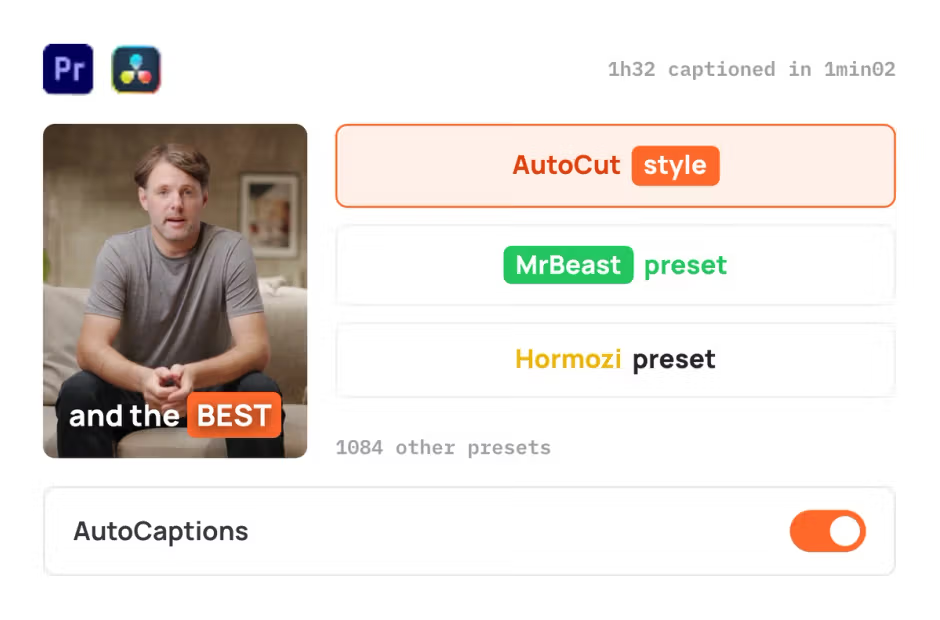
AutoCaptions
AutoCaptions generates animated captions and translates them instantly, boosting the dynamism and engagement of your videos.
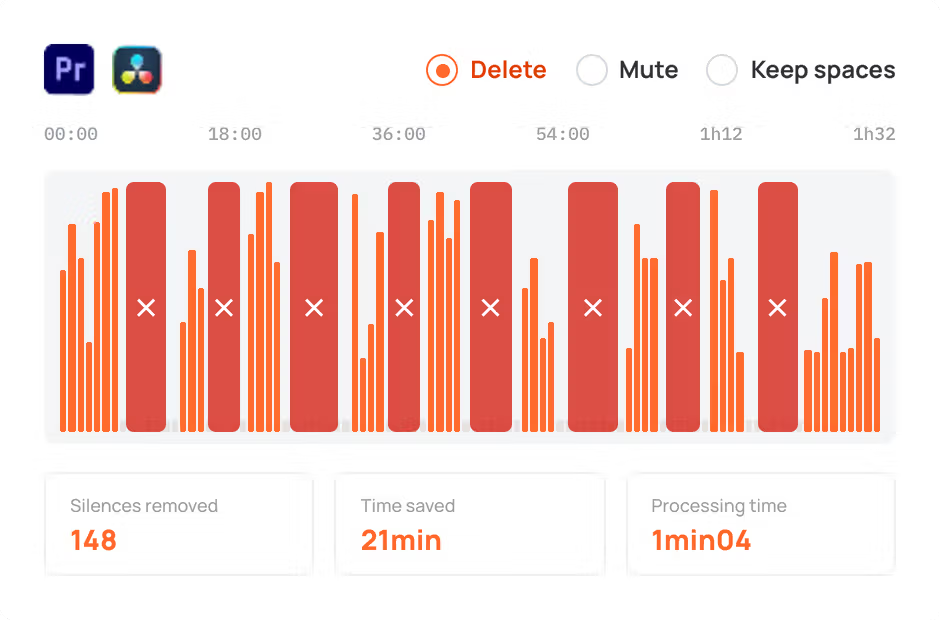
AutoCut Silences
AutoCut Silences eliminates pauses, enhancing video dynamics for a more captivating experience.
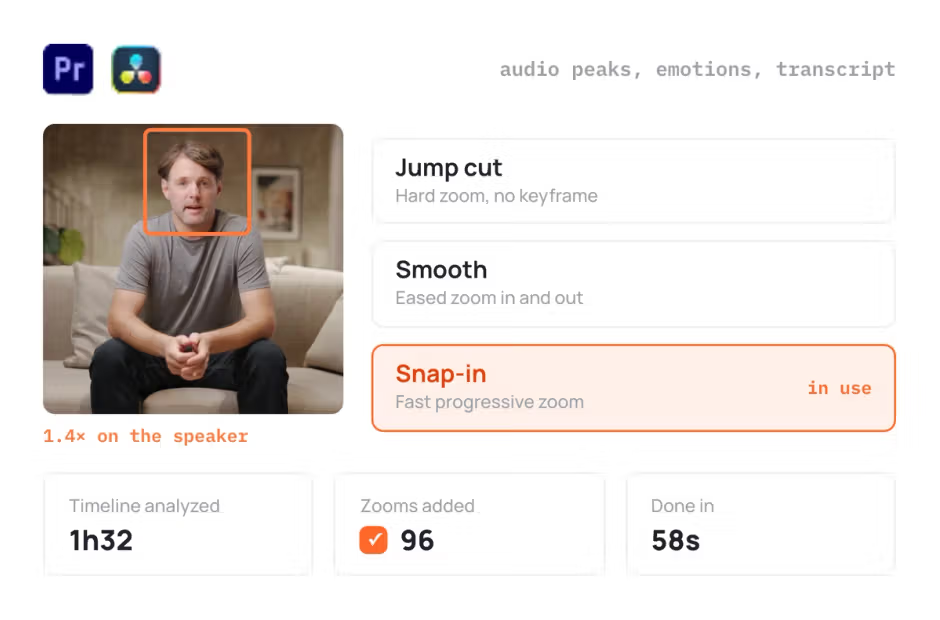
AutoZoom
AutoZoom applies smart and perfectly timed zooms to boost engagement and storytelling.
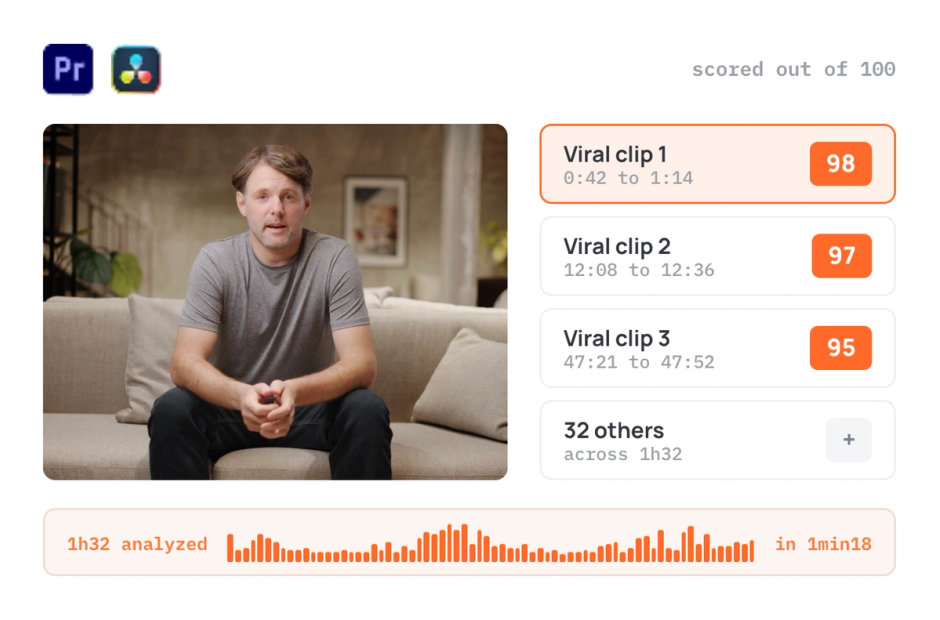
AutoViral
AutoViral identifies key segments in long videos for creating short-form content.
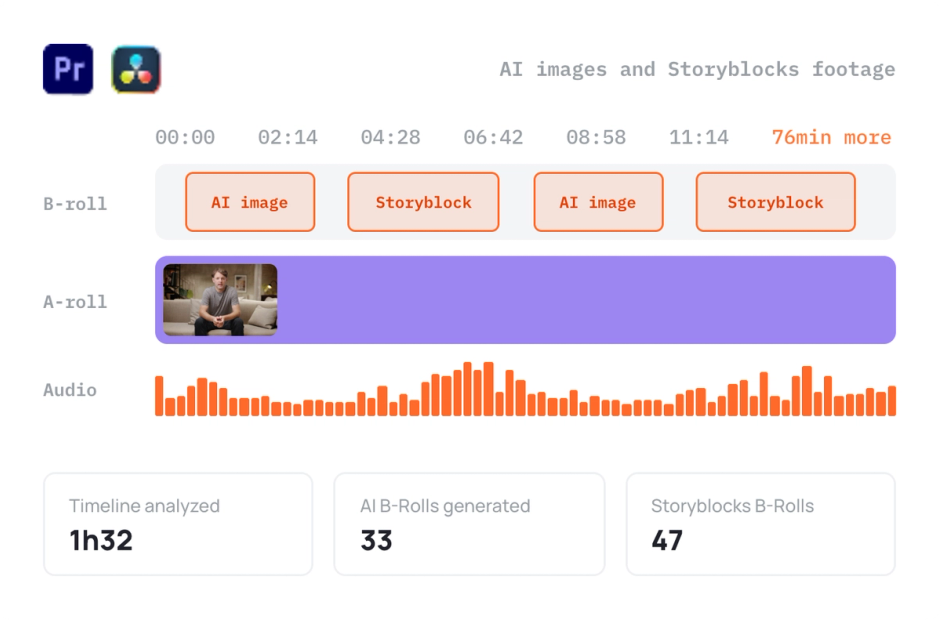
AutoB-Rolls
AutoB-Rolls uses AI to enrich your edits with perfectly integrated stock footage.
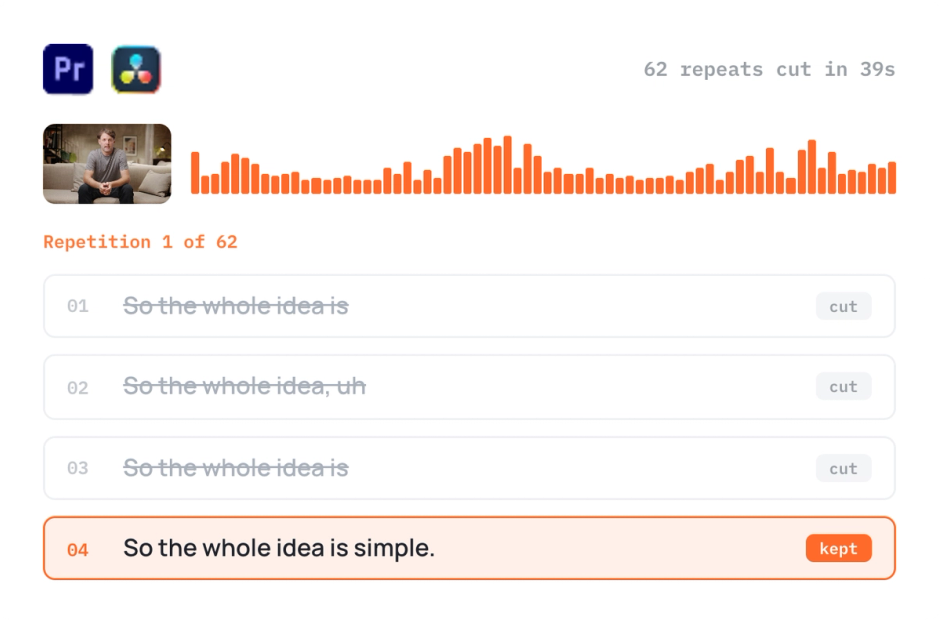
AutoCut Repeat
AutoCut Repeat identifies content repetitions and preserves only the best takes.
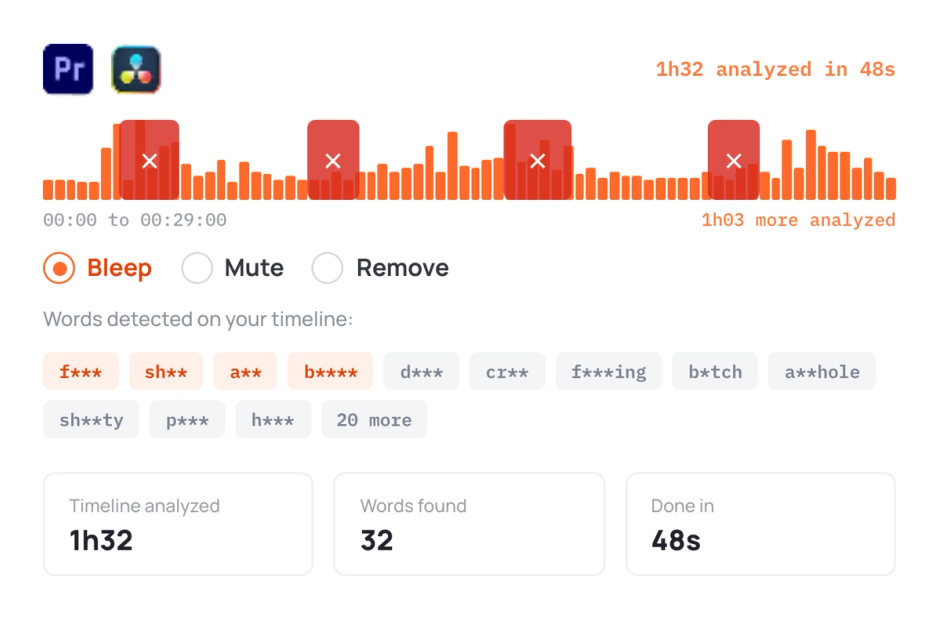
AutoProfanity Filter
AutoProfanity masks profanities with sound effects, ensuring content integrity.
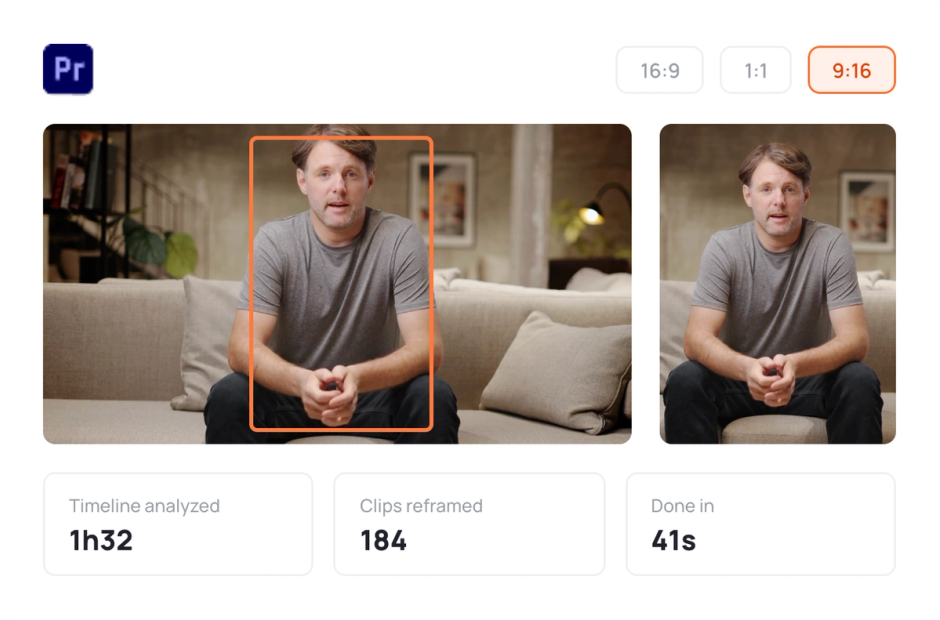
AutoResize
AutoResize adapts sequences to social formats, smartly keeping subjects centered.
Elevate your editing process with AutoCut now!