




Amélie BONNET
Marketing Manager
2026-04-28
Best Premiere Pro Plugins in 2026 (Ranked by real time saved)
What’s the best Premiere Pro plugin in 2026? We tested the top AI tools, workflow plugins, and editing extensions to find which ones actually save time.
Summarize content with
 Chatgpt
 Mistral
 Gemini
 Perplexity
Quick Ranking: Best Premiere Pro Plugins in 2026
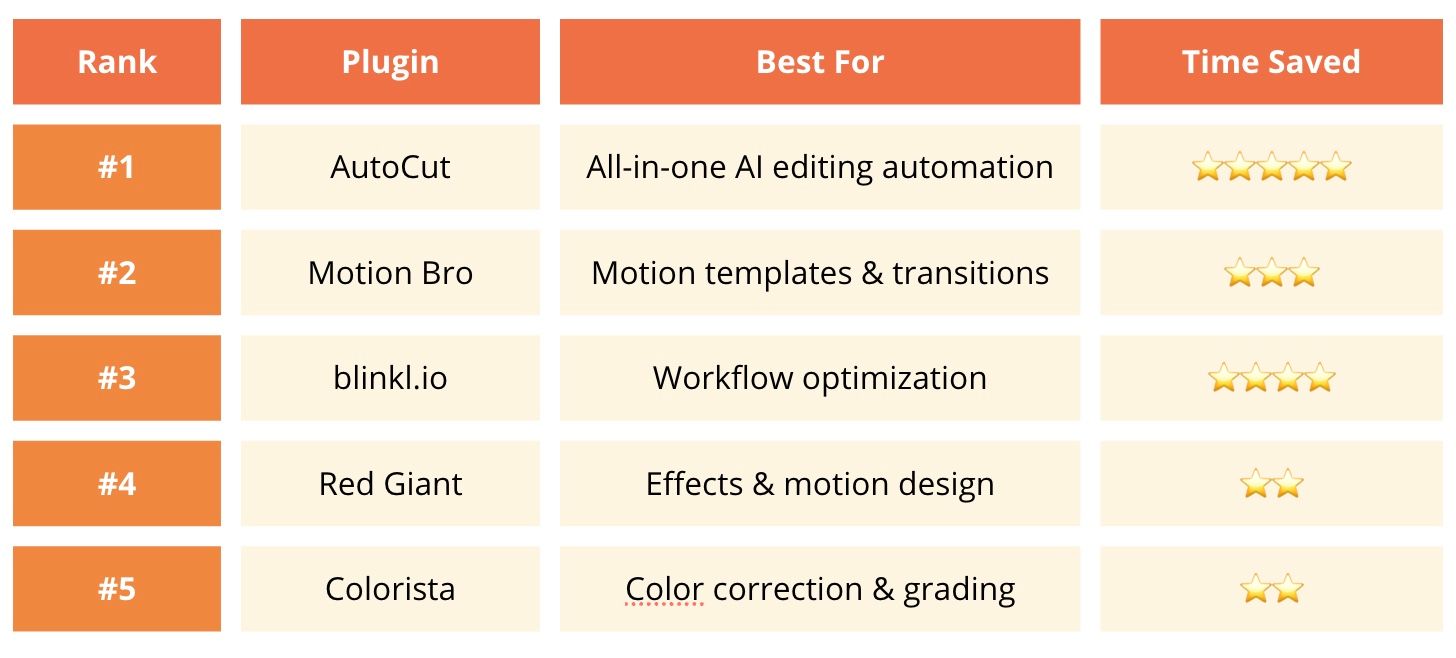
#1 AutoCut: Best overall plugin for real time saved
If you edit talking head videos, podcasts, tutorials, interviews, or social content, AutoCut adapts to your workflow not the other way around.
Whether you're a YouTuber, freelancer, or part of a content team, each feature solves a concrete editing problem. You can use only what you need, or combine everything for a fully automated workflow.
What it does
- Remove silences automatically. Clean your timeline instantly while preserving natural flow with J-cuts & L-cuts
- Detect repeated takes. Perfect for talking head videos: automatically keep the best version of a sentence when you recorded multiple takes
- Generate animated captions. Fully customizable with advanced styling options + 1000+ presets for social media
- Add zooms automatically. Multiple zoom styles and intensities, adjustable to match your editing style
- Edit multicam podcasts faster. Manage multiple cameras easily + save presets to reuse your editing setup
- Find viral moments from long videos. Turn long-form content into short-form clips quickly
- Auto B-roll suggestions. Automatically detect where to add B-roll + access stock footage from Storyblocks & Pexels
Why it ranks #1
Most plugins improve visuals. AutoCut improves your workflow. Instead of spending hours:
- cutting silences manually
- rewatching footage
- adding captions
- creating zooms
Best for:
- YouTubers
- Freelancers
- Agencies
- Podcasters
- Content teams
Bonus
- 14-day free trial
- No credit card required
- Just install and start editing
#2 Motion Bro: Best for motion templates
A powerful extension that gives you access to 5000+ transitions and presets directly inside Premiere Pro and After Effects. It acts as a smart toolbox to speed up motion design without manually keyframing everything.
What it does
- Apply transitions and presets in one click
- Customize animation (color, size, speed)
- Animate multiple layers at once
- Organize and manage presets efficiently
Best for:
- Social media editors
- Ads & promo videos
- Motion design beginners
Limitation :
It improves visuals, but doesn’t significantly reduce editing time on repetitive tasks.
#3 Blinkl.io: Best for workflow optimization
If your main frustration in Adobe Premiere Pro is spending time navigating menus instead of editing, Blinkl.io offers a faster way to work. It centralizes your tools into a single interface called the Ring, accessible directly under your cursor.
What it does
- Access tools instantly via a radial “Ring”
- Replace multiple clicks with one gesture
- Centralize effects, commands, and extensions
- Speed up repetitive actions
Why it stands out
Unlike traditional plugins that add features, blinkl.io improves how you interact with Premiere Pro. It reduces friction and keeps you focused on your timeline.
Best for:
- YouTube editors
- Gaming editors
- Short-form creators
Limitation:
- Only available on Premiere Pro
#4 Red Giant Universe: Best for effects
A professional suite used by designers and motion artists to add cinematic effects and stylized visuals.
What it does
- Add lighting, color, and stylized effects
- Create animated text and backgrounds
- Apply cinematic transitions
- Preview everything in real time
Best for:
- Music videos
- Commercial content
- Creative edits
Limitation:
Focused on visuals, not workflow speed or automation.
#5 Colorista: Best for color grading
A powerful plugin that brings professional color correction tools directly into your editing timeline.
What it does
- Real-time color grading inside Premiere Pro
- Advanced masking and tracking
- Multi-layer color adjustments
- Seamless integration with Adobe tools
Best for:
- Colorists
- Video editors working on visual polish
- Commercial and cinematic content
Limitation:
Does not improve editing speed, focused on post-production quality.
Best Premiere Pro plugin by use case
Best AI Plugin for Premiere Pro
🥇 AutoCut
Best Plugin for YouTube editors
🥇 AutoCut
Best Plugin for Motion graphics
🥇 Motion Bro
Best Plugin for workflow optimization
🥇 Blinkl.io
Best Plugin for effects
🥇 Red Giant Universe
Best Plugin for color grading
🥇 Colorista
Which Premiere Pro plugin should you choose in 2026?
Choose AutoCut if you want:
- To edit faster
- Automate repetitive tasks
- Increase your content output
- Simplify your workflow
- Focus on storytelling instead of technical work
Choose other plugins if your main goal is:
- Visual effects
- Motion design
- Color grading
Final Verdict
If you're asking what is the best Premiere Pro plugin in 2026, the answer depends on your workflow. But if the question is: Which plugin saves the most real time and helps creators grow faster?
The winner is clearly AutoCut.
FAQ
Best Premiere Pro Plugins (2026 Guide)
Find quick answers about the best Premiere Pro plugins in 2026, how to edit faster, and which AI tools save the most time.
For AI automation and productivity: AutoCut.
AutoCut is one of the most complete AI editing plugins available.
AutoCut thanks to captions, silence removal, zooms, and short-form workflows.
Some plugins offer free trials. AutoCut includes a 14-day free trial without requiring a credit card.
If editing time is your bottleneck, it can significantly speed up your workflow.
Amélie BONNET
Marketing Manager